WhatsApp reminders from your own number: what connecting means
Send appointment reminders from your salon's own WhatsApp. Free in GroomSome — here's why Meta sends the bill, how WhatsApp checks the message, and how setup works.
WhatsApp appointment reminders from your grooming salon's own number get seen: for many of your customers, WhatsApp is where they actually read their messages. GroomSome sends them under your salon's name and charges nothing for them.
One thing surprises people, though: the bill doesn't come from us. Meta, the company behind WhatsApp, charges your salon a small amount for every reminder it delivers. This post explains what connecting your WhatsApp actually means, why Meta sends the bill, how you can put the reminder in your own words and how WhatsApp checks it, and what setting it up looks like. No technical knowledge needed.
What your customers see
Your customer gets a WhatsApp message from your salon, with your name and your number, that reads something like this:
Hi Anna, this is a reminder from Happy Paws Grooming: Bobby has an appointment on Wednesday 14 October at 10:30. Reply STOP if you no longer want these reminders.
That's GroomSome's standard reminder. Send it just like that, or rewrite it so it sounds like you. Either way, GroomSome fills in the customer's first name, your salon's name, the pet's name, the date and the time. The reminder goes out in your salon's own language. If some of your customers speak another language (English, Dutch, German, French, Spanish, Italian or Hindi), you can add it, and they get their reminder in their own language.
Your customers don't have to install or sign up for anything. If they're on WhatsApp, the reminder simply arrives. A customer never gets the same reminder twice: customers on WhatsApp get it on WhatsApp instead of by SMS, never both. Email reminders carry on just as before. And if a customer replies STOP, your salon stops sending them reminders altogether, by WhatsApp, SMS and email.
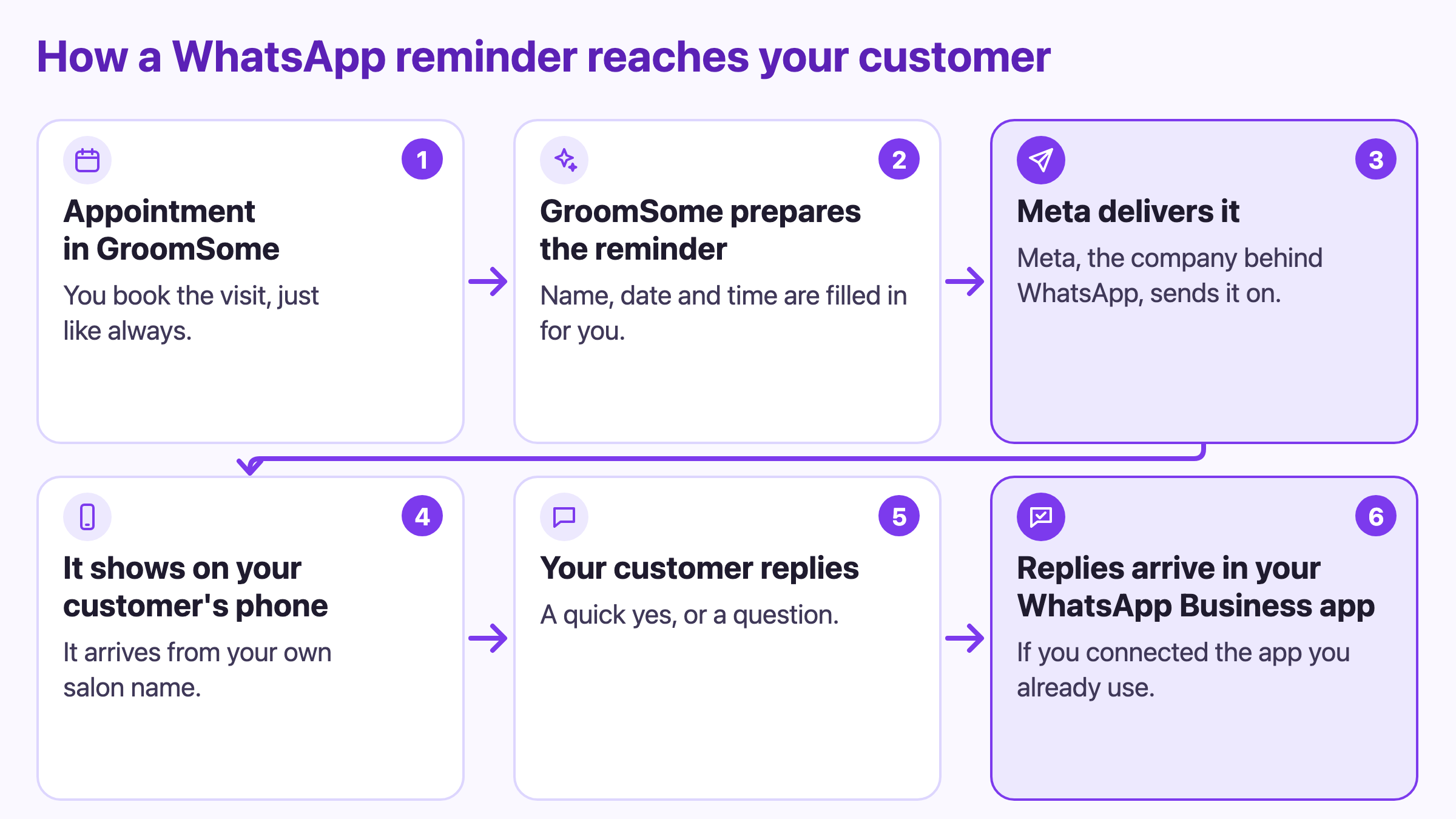
How a reminder travels
- You book the appointment in GroomSome, just like always.
- GroomSome prepares the reminder and fills in the name, the pet, the date and the time.
- Meta, the company behind WhatsApp, delivers it.
- It shows up on your customer's phone under your own salon's name.
- Your customer replies with a quick yes, or a question.
- If you connected the number you already use in the WhatsApp Business app, the reply arrives in that app, like any other chat.
So "connecting" means giving GroomSome permission to send these reminders from your salon's WhatsApp number. Your number, your profile and your WhatsApp Business account stay yours. GroomSome gets to send the reminder; it doesn't take over your WhatsApp.
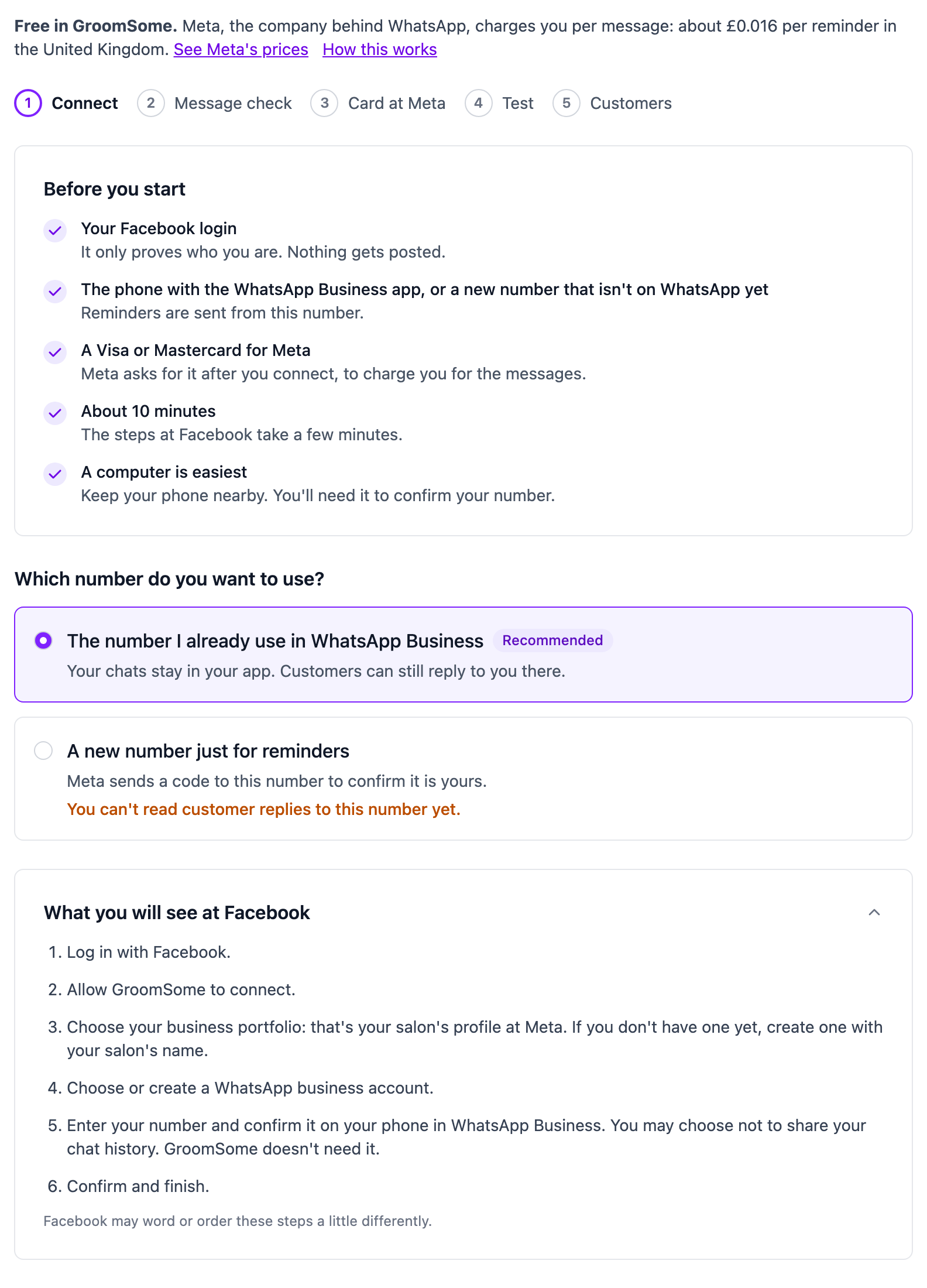
There are two ways to connect:
- The number you already use in the WhatsApp Business app (recommended). You keep your number, your name, your photo and your chats, and the app keeps working on your phone. Meta sets one condition: open the WhatsApp Business app on that phone at least every two weeks. If it isn't used for about 14 days, Meta disconnects it and you connect again.
- A new number just for reminders. Meta sends a code to that number to confirm it's yours. Be aware that customer replies to a new number can't be read anywhere yet, so choose your existing number if you want to read replies.
Who you pay, and why it's Meta
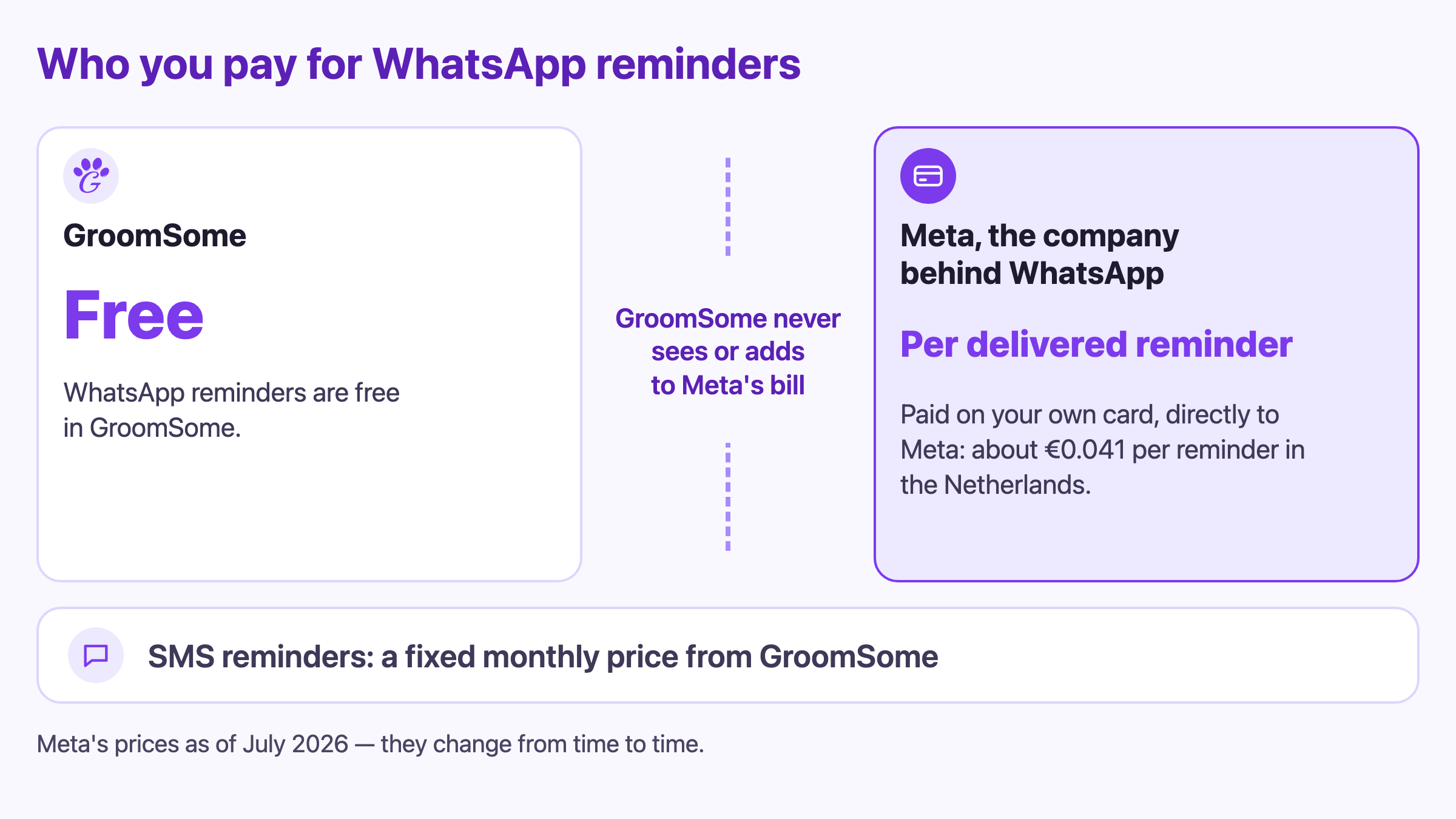
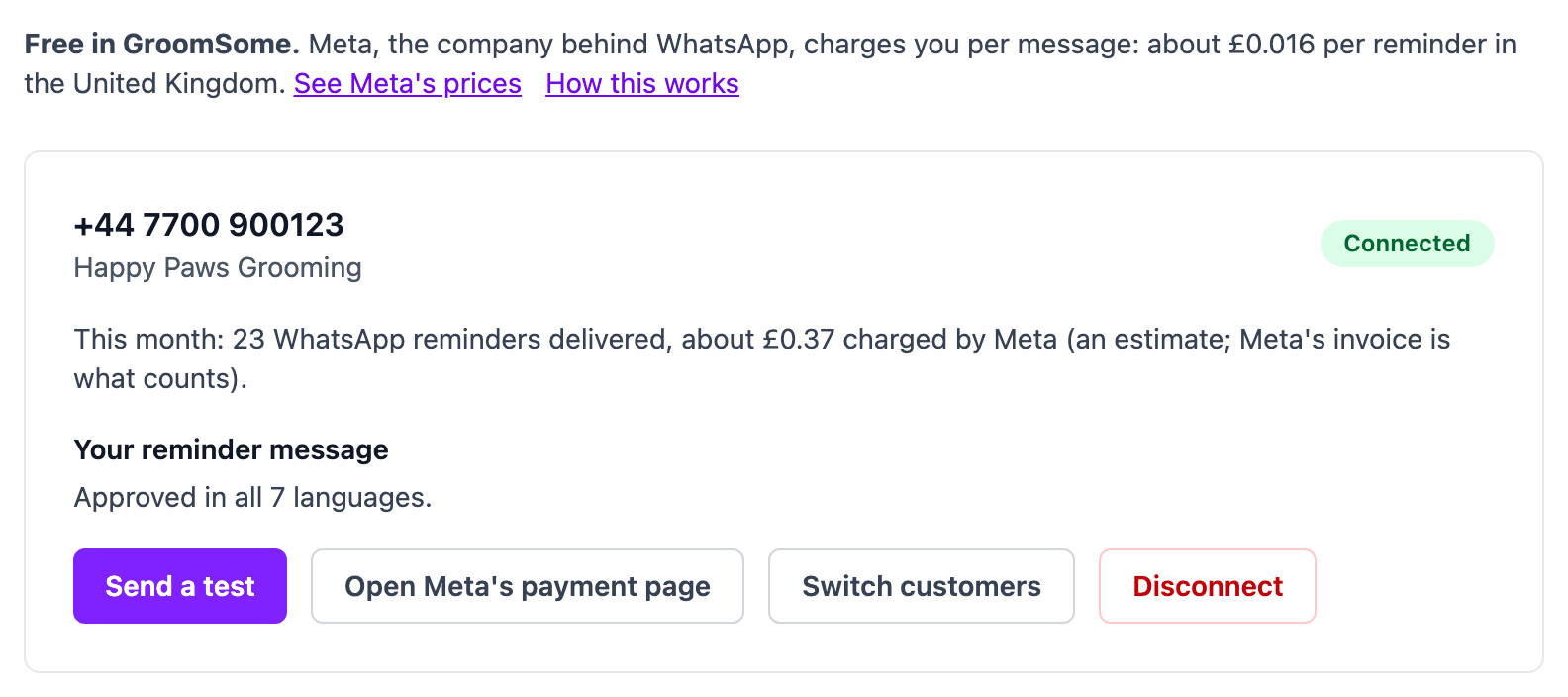
The short version: GroomSome charges nothing for WhatsApp reminders. Meta charges you for each reminder it delivers.
Meta charges every business that sends reminders on WhatsApp, per message. Your WhatsApp number and your account at Meta belong to you, so Meta bills you directly, on a Visa or Mastercard you add at Meta. GroomSome never sees that bill, never adds anything to it, and never sees your card.
A few things worth knowing:
- You only pay for delivered reminders. A reminder to someone who isn't on WhatsApp costs nothing.
- There is no monthly fee from Meta and no charge for the number. Only the price per reminder.
- Without a card at Meta, no WhatsApp reminders go out. Meta doesn't deliver them until you've added one, and GroomSome tells you when that's the problem.
- The price depends on the country of your customer's phone number.
This is what Meta charges per delivered reminder:
- Netherlands: about €0.041
- Germany: about €0.046
- France: about €0.025
- Italy: about €0.025
- Spain: about €0.017
- Belgium, Austria and Switzerland: about €0.014
- United Kingdom: about £0.016
- United States: about $0.003
- India: about ₹0.12
These are Meta's prices as of 1 July 2026, excluding VAT. Meta sets them and may change them, so check Meta's prices for the current ones. Inside GroomSome, the price for your own country is shown wherever you switch WhatsApp reminders on. Meta's invoice is what counts.
How that compares with SMS
SMS reminders work the other way round. They're a GroomSome add-on with a fixed monthly price, however many reminders you send: for example €4.99 a month in the Netherlands, £4.99 in the United Kingdom or $4.99 in the United States. Our pricing page shows the price for your country. On WhatsApp you pay Meta per reminder instead: 100 reminders a month cost about €4.14 in the Netherlands, about £1.59 in the United Kingdom and about $0.34 in the United States. Before you switch WhatsApp reminders on, GroomSome works out the same sum for your own appointments of the last 30 days.
You can also have both. With WhatsApp and SMS reminders both on, customers on WhatsApp get WhatsApp, and a customer who isn't on WhatsApp gets an SMS instead. You then pay GroomSome for the SMS add-on and Meta for the WhatsApp reminders. With WhatsApp reminders only, a customer who isn't on WhatsApp gets email reminders only, and GroomSome lets you know who that is.
Your reminder message, and how WhatsApp checks it
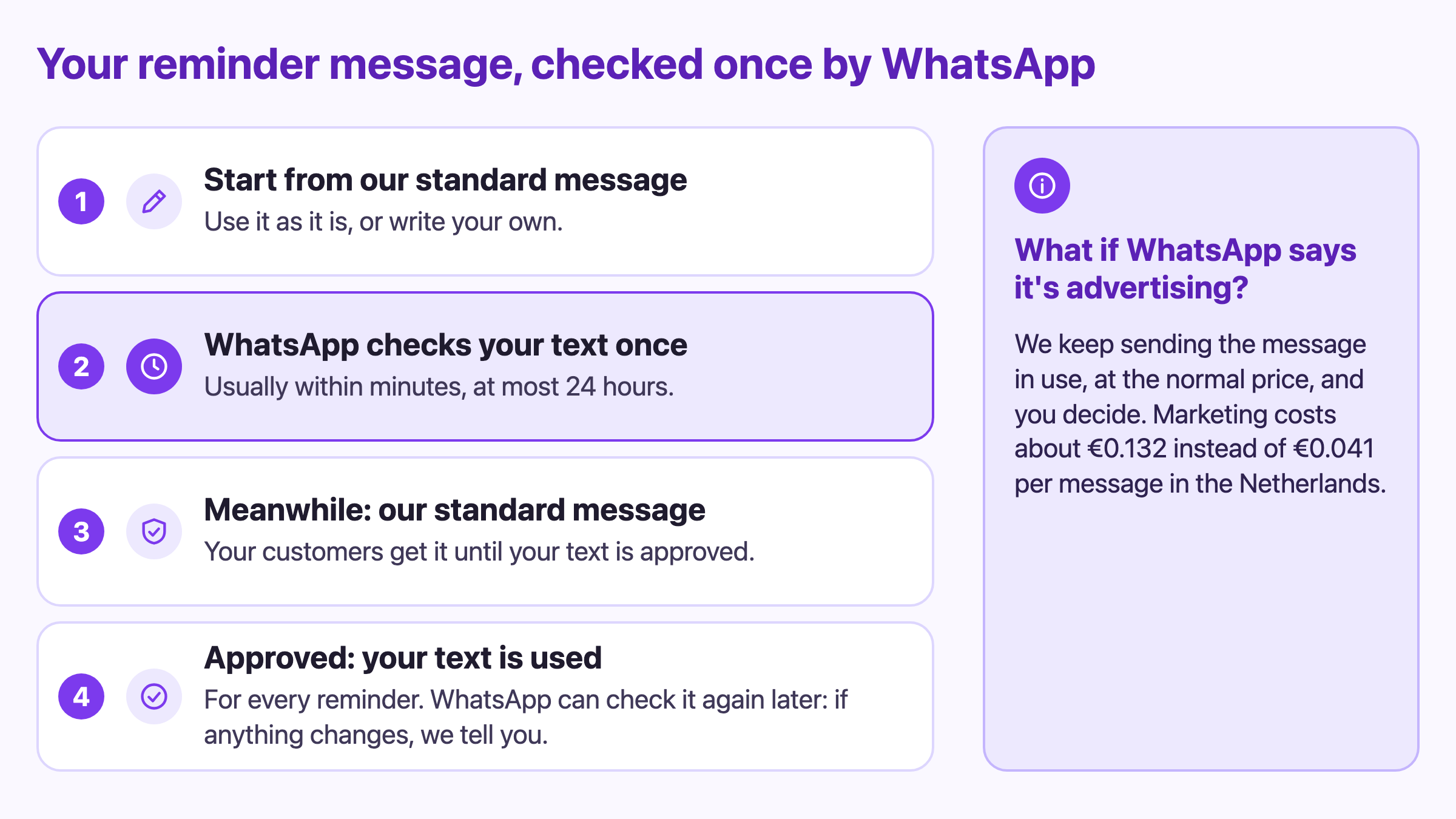
WhatsApp doesn't let a business start a conversation with just any text. The first message has to be one WhatsApp has checked. That keeps spam out of your customers' WhatsApp, and it's why every reminder text is checked once before it's used.
- You start from GroomSome's standard reminder. Send it as it is, or rewrite it in your own words.
- WhatsApp checks your text once: usually within minutes, at most within a day. You don't have to wait for it; carry on with the next step, or close the page.
- Until your own text is approved, your customers get the standard reminder, so nobody misses a reminder in the meantime.
- Once it's approved, it's used for every reminder, with each customer's details filled in. WhatsApp can check it again later; if anything changes, GroomSome tells you.
Every reminder ends with the same line: "Reply STOP if you no longer want these reminders." It's always added, so your customers can stop whenever they like, and GroomSome takes care of their STOP replies.
Keep it a reminder. Meta charges far more for advertising than for reminders. In the Netherlands a reminder costs about €0.041 and a marketing message about €0.132, more than three times as much, and customers who turned off offers in WhatsApp don't receive marketing at all. A discount, an offer, "book again" or a request for a review is enough for WhatsApp to treat a message as marketing.
If WhatsApp does see advertising in your text, nothing changes for your customers. GroomSome keeps sending the reminder they get now, at the normal price, tells you, and lets you decide: change your text, or knowingly send it anyway at the marketing price. You see what that would cost before you agree. Nothing ever costs more unless you say so.
Setting it up in about 10 minutes
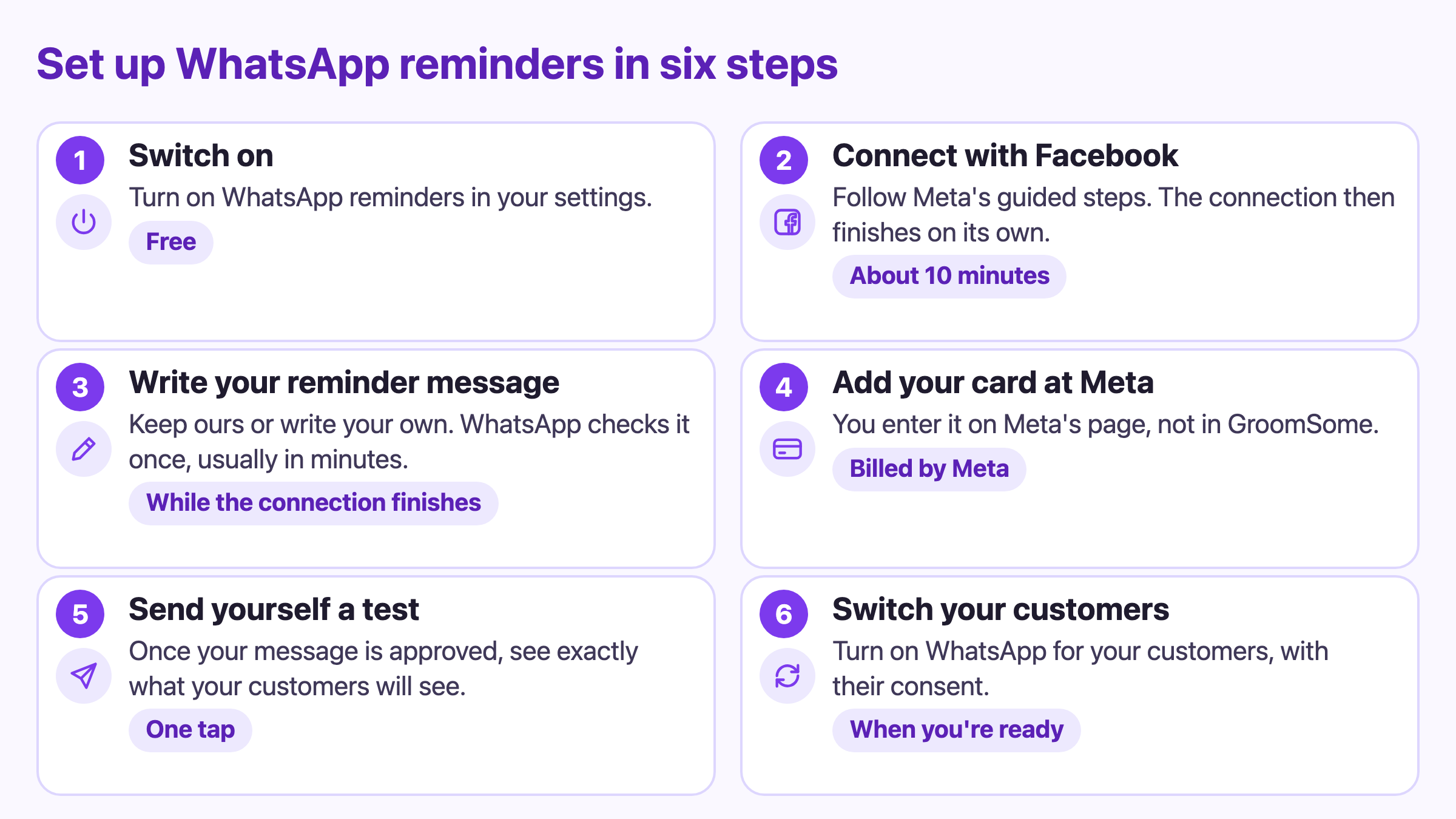
Before you start, have these ready:
- Your Facebook login. It only proves who you are to Meta; nothing gets posted.
- The phone with your WhatsApp Business app, or a new number that isn't on WhatsApp yet.
- A Visa or Mastercard for Meta. Meta asks for it after you connect.
- About 10 minutes. A computer is easiest; keep your phone nearby to confirm your number. In the GroomSome mobile app, the button says "Continue in your browser" and you finish there.
Then it's six steps:
Switch on WhatsApp reminders. On the WhatsApp page in your settings, or on your Subscription page. It's free.
Connect with Facebook. Choose your number, click "Connect with Facebook" and follow Meta's guided steps: log in, allow GroomSome to connect, choose your business and a WhatsApp Business account, then add your number. If Meta asks for a business portfolio, that's simply your salon's profile at Meta.
With the number from your WhatsApp Business app, you confirm it on your phone, and you may choose not to share your chat history: GroomSome doesn't need it. With a new number, you use your salon's name as the display name and enter the code Meta sends you. After that, the connection finishes on its own, usually in less than a minute. You don't have to wait for it.
Write your reminder message. You can start straight away, while the connection finishes. Keep the standard message or write your own; WhatsApp checks it in minutes, at most a day.
Add your card at Meta. GroomSome opens Meta's payment page for you. You add your Visa or Mastercard there, not in GroomSome.
Send yourself a test. As soon as WhatsApp has approved your message, you see exactly what your customers will see. If Meta can't charge your card yet, GroomSome takes you back to the card step.
Switch your customers. GroomSome shows how many of your customers can get their reminders on WhatsApp. WhatsApp expects them to have agreed to messages from your salon, so you confirm that with a tick-box and switch them over in one go. Reminders that were already planned move over too.
For customers you add later, WhatsApp is already selected: once reminders are on for them, they get them on WhatsApp. You can switch WhatsApp off for any single customer on their customer page. If something gets stuck, the WhatsApp page tells you what happened and what to do next.
What GroomSome stores, and what it never sees
Connecting your WhatsApp doesn't hand your WhatsApp over to GroomSome.
- Your chats stay yours. GroomSome never stores your chats or your contacts. It only checks customer replies for STOP.
- Your card and Meta's bill stay between you and Meta. You add the card on Meta's own page; GroomSome never sees it, or the bill.
- What GroomSome does keep: your WhatsApp number and salon name, the status of your connection, your reminder message and whether WhatsApp approved it, when you confirmed your customers' consent, whether each reminder was delivered, who agreed to the marketing price and when (only if you choose it), and the connection key that lets GroomSome send reminders from your number. That key is stored encrypted.
- Disconnecting is clean. When you disconnect, GroomSome deletes the key straight away. Your number and your WhatsApp Business account stay yours; nothing at Meta gets deleted.
Questions salons ask
Do my customers need to do anything?
No. If they have WhatsApp on the mobile number you have for them, the reminder simply arrives under your salon's name, and they can reply STOP at any time.
Can I keep using WhatsApp on my phone?
Yes, if you connect the number you already use in the WhatsApp Business app: it keeps working as before, and replies to reminders land there. Just open it at least every two weeks, or Meta disconnects it.
What if a customer doesn't have WhatsApp?
The attempt costs nothing. They get an SMS instead if you also have SMS reminders and SMS is on for them; otherwise they get email reminders only, and GroomSome lets you know.
Can I change the message?
Yes. Keep GroomSome's standard reminder, or write your own and change it whenever you like. WhatsApp checks each new text once, and until it's approved, your customers keep getting the message they get now. GroomSome fills in the customer, pet, date and time for you, and always adds the STOP line.
What happens if I disconnect?
WhatsApp reminders stop, and reminders that haven't gone out yet go by SMS (if you have SMS reminders) or by email. Your number, your WhatsApp Business account and your chats stay yours, and you can connect again whenever you like.
Already using GroomSome and still have a question about WhatsApp reminders? Ask us through "Share your feedback" in Settings.