Invoice Export - Tax Season Made Simple
CSV, Excel or UBL export of your grooming invoices, with VAT summary and date-range filtering. Hand your accountant exactly what they need.
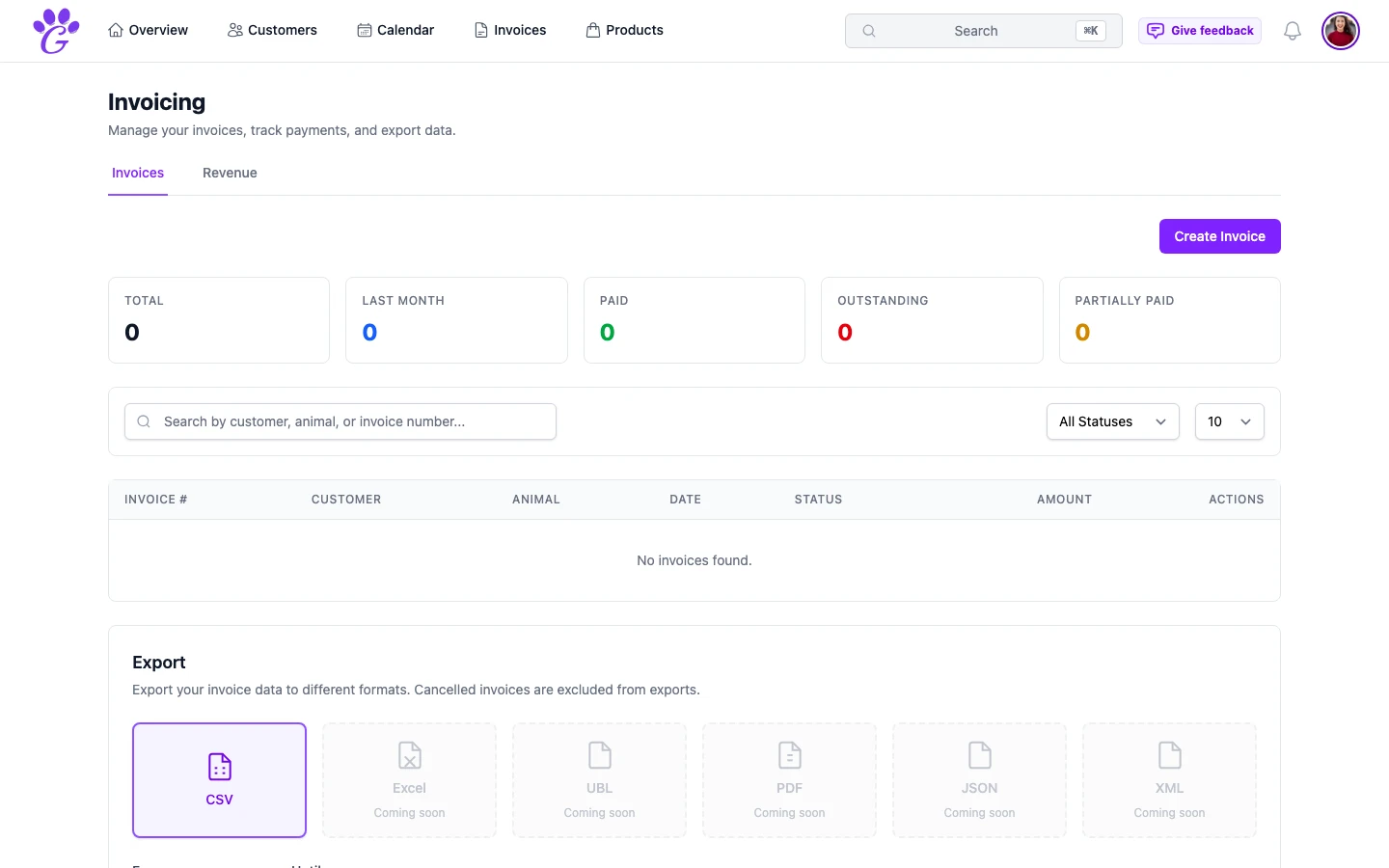
Tax time for most grooming salons used to mean one of two things: a frantic weekend with a calculator and a shoebox, or a hefty bill from an accountant who had to reconcile your paper trail. Neither is a good use of a groomer's January. The single change that prevents both is having a clean, structured export of every invoice you issued last year, and being able to produce it in a couple of clicks.
That's what invoice export is. Not a fancy feature, not a complex reporting tool: just the ability to hand your accountant (or the tax office) exactly the data they need, exactly in the format they accept.
What is invoice export in GroomSome?
Invoice export is the built-in way to get your invoice data out of GroomSome as a CSV, Excel, UBL e-invoice (NL-CIUS), JSON or XML file. You pick the date range and the format, and the system produces a structured file with every invoice, its VAT and its payment status, plus a VAT summary by rate.
The output is structured the way accountants actually use it: one row per invoice in CSV and Excel, with every line item in the UBL, JSON and XML files. Every number balances. Nothing is an image or a free-text field.
Why invoice export matters for groomers
The practical upside is obvious: less January pain. But the deeper reason is that clean, exportable data is what separates a business that can answer a question in ten seconds from one that needs a weekend to find the answer.
- Tax season becomes a morning. Export the year, send to your accountant, done. No reconciliation, no reconstructing invoices from bank statements.
- Quarterly VAT returns stop being scary. Exporting a quarter with VAT broken down by rate is literally two clicks.
- Clear evidence if the tax office asks. "Please send us a schedule of invoices for Q3." You have it, formatted properly, in a minute.
- Easy switch between accountants. If you change bookkeeper, you're not tied to one system; the data exports cleanly.
- No data lock-in. Your data is yours. Export it any time; nobody is keeping it hostage.
- Ready for your bookkeeping software. There's no direct integration, but you can hand over CSV, Excel or UBL e-invoice files.
Key capabilities
- CSV, Excel and UBL export: standard formats that open in Excel or Numbers; UBL is the Dutch e-invoice standard (NL-CIUS).
- Date range selection: export last quarter, last year, or any custom period.
- Tax summary export: taxable amount and VAT per rate.
- Invoice list or line-item detail: CSV and Excel give one row per invoice; UBL, JSON and XML include every line item.
- Paid vs outstanding: every row carries its payment status, not just the total.
- Customer reference: invoices include customer and pet information for context.
How to use it at tax time
The ideal flow takes less time than making a cup of coffee.
- Go to Invoices → Export. Pick the date range (usually the tax year or quarter).
- Choose the format: CSV or Excel for most accountants, UBL if their software reads e-invoices.
- Check the VAT summary: it's included automatically, as a section at the end of the CSV or a separate sheet in Excel, breaking down VAT by rate.
- Download the CSV. Open it in Excel or Numbers to sanity-check the totals.
- Email it to your accountant. Or upload to a shared folder if that's their workflow.
The tax return isn't magically done, but the data bit (the part that takes most of the time) is.
Sanity-check before sending
A quick pre-flight to catch the most common issues before your accountant sees them:
- Totals match the dashboard. If the CSV sum doesn't match what GroomSome shows on the dashboard, you missed marking some invoices as paid.
- No missing dates. Every invoice should have a date.
- VAT rows present. Check that the VAT column is populated; a missing rate here is a red flag.
- Cancellations accounted for. GroomSome leaves cancelled invoices out of the export, so tell your accountant about any you cancelled.
- Customer names are present. Helpful if your accountant wants to reconcile a specific customer's invoices.
If anything is off, fix it in GroomSome first. A corrected export is a minute's work; a corrected tax return is an afternoon.
Beyond tax season
Export isn't only for the annual return. A few ongoing uses that pay back the five minutes:
- Monthly close. Export the previous month on the first, archive it alongside the bank statement.
- Quarterly VAT returns. Two clicks, not a reconstruction.
- Price analysis. Line-item exports let you spot which services are earning and which aren't.
- Audit trail. Keep a rolling archive of monthly exports, useful if a tax query ever comes up years later.
Invoice export is one of those features that sounds dull until you need it and then becomes the most important thing in the product. A clean CSV at tax time is the difference between a lost weekend and a calm morning, and it's also what keeps your data yours, portable and understandable regardless of what you use next year.