Pet Timeline - Every Visit, Note and Photo in One Place
A chronological grooming history per pet. Appointments, notes, and before/after photos in one scrollable view. Answer 'what did you do last time?' in seconds.
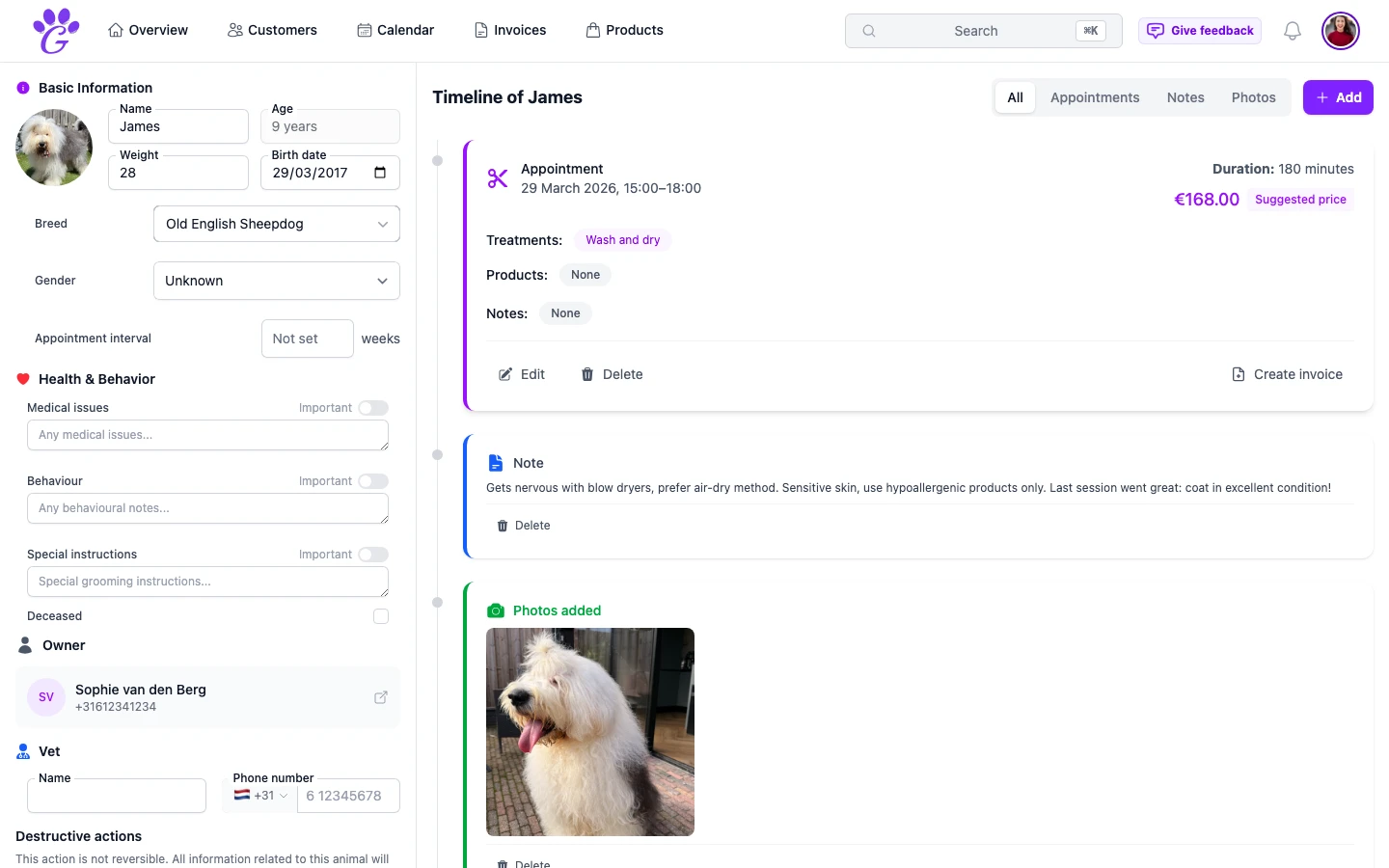
A regular client walks in with a Cavalier that hasn't been in since February. "Can you just do what you did last time?" It's a fair question, except the answer is sitting somewhere in your head, between a thousand other dogs, and you'd rather not guess. Five minutes of flipping through a paper book later, you find last time's note. Or you don't.
A pet timeline solves this at the level where the problem actually lives: per dog, chronologically, with notes and photos merged into the same view as the appointments. One scroll and the whole grooming history of that one animal is in front of you.
What is the pet timeline in GroomSome?
The timeline is the chronological record of everything that has ever happened for one pet: appointments, notes, photos, invoice references. Instead of separate lists for each type of record, they're merged into a single feed, newest first, so the full story of the dog is visible as you scroll.
You can filter the feed if you only want appointments, only photos, or only notes. You can scroll back through years of history without clicking through pages. And you can edit appointments directly from the timeline, and remove notes or photos there too; no switching between screens for a two-word update.
Why a pet timeline matters for groomers
Grooming quality is cumulative. A dog that's been coming in every eight weeks for two years is a known quantity: you know their coat, their temperament, what the owner likes, what to avoid. But all of that only pays off if you can find it quickly.
- "What did you do last time?" has an instant answer. No flipping, no guessing. The last appointment is right at the top.
- Changes over time become visible. A dog that's losing weight, a coat that's getting thinner, a behaviour that's been creeping in; the timeline surfaces the pattern.
- Notes stop living in your head. A quick post-groom note ("didn't like the high velocity dryer, switched to stand") is two taps and it's permanently attached to the dog.
- Handoff is genuinely possible. A colleague covering your holiday can read the timeline in ninety seconds and groom the dog like they've known it.
- Client conversations are easier. "The last few times we've shortened around the face slightly; do you want to keep that going?" sounds confident because it's true.
Key capabilities
- Merged chronological view: appointments, notes, and photos in a single feed, newest first.
- Filter by type: show only appointments, only notes, or only photos when you need focus.
- Inline appointment editing: update the treatments, prices, products or notes without leaving the timeline.
- Photos: before/after shots on the dog's timeline, with date and optional description.
- Note entries with author: if you have a team, you know who wrote which note.
- Auto-save: typing is saved as you go; no "did I save that?" anxiety.
- Infinite scroll: years of history without pagination; the oldest visit is just further down.
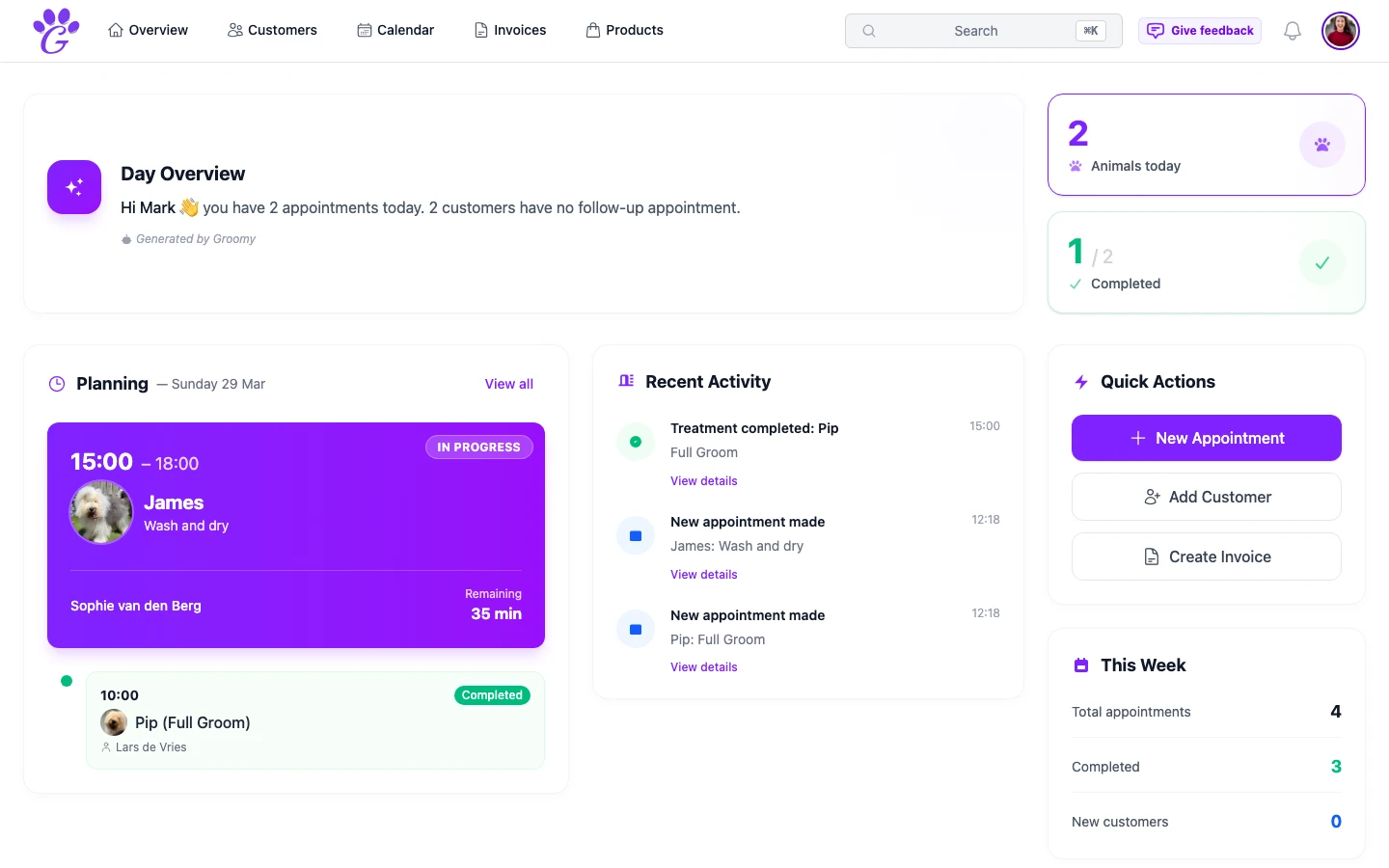
- Deep links from the dashboard: tap today's appointment, land on the dog, see the full history.
How to get started
The timeline fills itself in as you work; you don't have to set up anything special. A few habits make it dramatically more useful:
- Add a one-line note after each appointment. Temperament, coat condition, any change in preference. Takes ten seconds.
- Snap a photo before and after, even quick phone shots. Over a few visits the gallery becomes a quiet quality check on your own work.
- Use the importance flag for any medical or behavioural issue that future-you must not miss.
- Check the timeline before walk-in. A thirty-second read before the dog comes in is one of the highest-leverage things you can do.
Within a couple of months, the timeline carries enough history that "can you just do what you did last time?" becomes a genuinely easy question.
A pet timeline is the part of grooming software that clients never see but always benefit from. They don't know you checked; they just know the dog leaves looking right, feeling safe, and finished on time. The work you've done over a year quietly becomes the work you can now do faster and better.